WebGPU 正交投影
原文作者:webgpufundamentals Contributors
原文链接:https://webgpufundamentals.org/webgpu/lessons/webgpu-orthographic-projection.html
说明:本文为技术深度解读,非逐字全盘翻译。代码保留原文英文形式,叙述性内容编译为中文。
本文是 WebGPU 3D 数学系列的第 5 篇。前四篇依次为:平移、旋转、缩放、矩阵数学。本篇之后将进入透视投影、相机、矩阵栈和场景图等内容。
本文核心优化要点
- 启用深度纹理与深度比较测试:通过
depthStencil状态让 GPU 自动处理遮挡,避免手动排序三角形,同时减少过度绘制(overdraw)。 - 合并顶点属性到单一交错缓冲区:将位置与颜色存储在同一
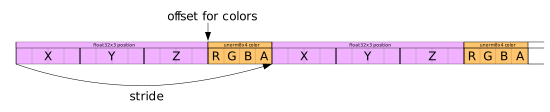
GPUBuffer中,使用一次setVertexBuffer完成绑定,减少状态切换,提升缓存局部性。 - 利用背面剔除 + 顶点颜色属性 + 复用矩阵数组:设置
cullMode剔除背向三角形,减少光栅化和片元着色器压力;用unorm8x4顶点颜色替代 uniform 颜色,避免每帧更新动态 uniform;矩阵运算复用dst数组降低分配开销。
从 2D 到 3D 的矩阵扩展
在之前的 2D 示例中,我们使用 3×3 矩阵处理 (x, y) 点。进入 3D 需要点 (x, y, z) 和 4×4 矩阵。顶点着色器从 vec2f 位置改为 vec4f,矩阵从 mat3x3f 改为 mat4x4f:
struct Uniforms {
  color: vec4f,
-  matrix: mat3x3f,
+  matrix: mat4x4f,
};

struct Vertex {
-  @location(0) position: vec2f,
+  @location(0) position: vec4f,
};

struct VSOutput {
  @builtin(position) position: vec4f,
};

@group(0) @binding(0) `var<uniform>` uni: Uniforms;

@vertex fn vs(vert: Vertex) -> VSOutput {
  var vsOut: VSOutput;
-
-  let clipSpace = (uni.matrix * vec3f(vert.position, 1)).xy;
-  vsOut.position = vec4f(clipSpace, 0.0, 1.0);
  vsOut.position = uni.matrix * vert.position;
  return vsOut;
}

@fragment fn fs(vsOut: VSOutput) -> @location(0) vec4f {
  return uni.color;
}
在 3D 中,w 分量默认值为 1,因此可以直接将 vec4f 位置与 4×4 矩阵相乘,简化了着色器代码。
构建 3D “F” 几何体
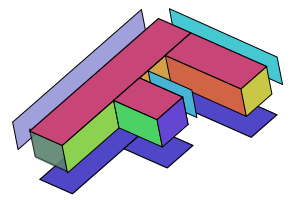
为了呈现立体效果,需要在前、后、左、右、顶、底等面上创建三角形。一个更直观的方法是复制前面顶点并将 z 坐标改为 30,然后添加索引来连接前后表面:
const positions = [
  // 前面
  0, 0, 0,
  30, 0, 0,
  0, 150, 0,
  30, 150, 0,
  // ... 其余顶点
  // 后面
  0, 0, 30,
  30, 0, 30,
  0, 150, 30,
  30, 150, 30,
  // ...
];

const indices = [
  // 前面
  0,  1,  2,    2,  1,  3,
  // ...
  // 后面
  12,  13,  14,   14, 13, 15,
  // ...
];
随后使用非索引方式并为每个面赋予不同颜色,以便在渲染时更容易辨别 3D 结构:
const quadColors = [
  200,  70, 120,  // left column front
  200,  70, 120,  // top rung front
  // ...
];

const numVertices = indices.length;
const vertexData = new Float32Array(numVertices * 4); // xyz + color
const colorData = new Uint8Array(vertexData.buffer);

for (let i = 0; i < indices.length; ++i) {
  const positionNdx = indices[i] * 3;
  const position = positions.slice(positionNdx, positionNdx + 3);
  vertexData.set(position, i * 4);

  const quadNdx = (i / 6 | 0) * 3;
  const color = quadColors.slice(quadNdx, quadNdx + 3);
  colorData.set(color, i * 16 + 12);  // set RGB
  colorData[i * 16 + 15] = 255;       // set A
}
这里将顶点数据视为 Float32Array,同时用 Uint8Array 视图写入 RGBA 颜色字节。颜色在 GPU 端通过 unorm8x4 格式自动归一化到 0~1 范围,无需手动除以 255。

矩阵函数与正交投影
3D 平移、旋转和缩放矩阵在 Float32Array(16) 中按列主序存储。核心函数示例:
const mat4 = {
  translation([tx, ty, tz], dst) {
    dst = dst || new Float32Array(16);
    dst[ 0] = 1;   dst[ 1] = 0;   dst[ 2] = 0;   dst[ 3] = 0;
    dst[ 4] = 0;   dst[ 5] = 1;   dst[ 6] = 0;   dst[ 7] = 0;
    dst[ 8] = 0;   dst[ 9] = 0;   dst[10] = 1;   dst[11] = 0;
    dst[12] = tx;  dst[13] = ty;  dst[14] = tz;  dst[15] = 1;
    return dst;
  },

  rotationX(angleInRadians, dst) {
    const c = Math.cos(angleInRadians);
    const s = Math.sin(angleInRadians);
    dst = dst || new Float32Array(16);
    dst[ 0] = 1;  dst[ 1] = 0;   dst[ 2] = 0;  dst[ 3] = 0;
    dst[ 4] = 0;  dst[ 5] = c;   dst[ 6] = s;  dst[ 7] = 0;
    dst[ 8] = 0;  dst[ 9] = -s;  dst[10] = c;  dst[11] = 0;
    dst[12] = 0;  dst[13] = 0;   dst[14] = 0;  dst[15] = 1;
    return dst;
  },

  // rotationY, rotationZ, scaling ...
};
正交投影函数采用更通用的参数形式,允许显式指定左、右、下、上、近、远六个裁剪面:
ortho(left, right, bottom, top, near, far, dst) {
  dst = dst || new Float32Array(16);

  dst[0] = 2 / (right - left);
  dst[1] = 0;
  dst[2] = 0;
  dst[3] = 0;

  dst[4] = 0;
  dst[5] = 2 / (top - bottom);
  dst[6] = 0;
  dst[7] = 0;

  dst[8] = 0;
  dst[9] = 0;
  dst[10] = 1 / (near - far);
  dst[11] = 0;

  dst[12] = (right + left) / (left - right);
  dst[13] = (top + bottom) / (bottom - top);
  dst[14] = near / (near - far);
  dst[15] = 1;

  return dst;
}
调用示例:
mat4.ortho(
  0,                   // left
  canvas.clientWidth,  // right
  canvas.clientHeight, // bottom
  0,                   // top
  200,                 // near
  -200,                // far
  matrixValue,         // dst
);
背面剔除与深度纹理
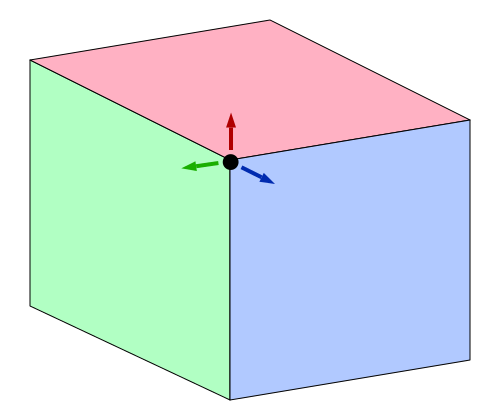
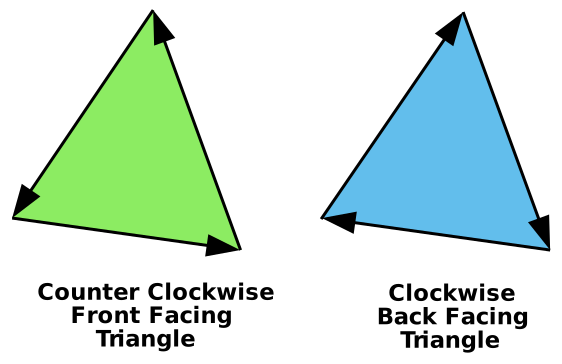
如果直接绘制所有三角形,后面的三角形可能覆盖前面的,导致视觉混乱。WebGPU 提供 cullMode 来剔除特定朝向的三角形:
primitive: {
  cullMode: 'front',  // 或 'back'
},
在像素空间中 Y 轴向下,矩阵会垂直翻转所有三角形,因此这里选择 cullMode: 'front' 并确保所有三角形顶点方向一致。
仅靠剔除仍无法解决深度遮挡顺序问题。解决方案是引入 深度纹理(深度缓冲 / Z-Buffer)。建立深度纹理并在渲染管线中配置深度测试:
depthStencil: {
  depthWriteEnabled: true,
  depthCompare: 'less',
  format: 'depth24plus',
},
depthCompare: 'less' 表示只有新片元的深度值小于深度缓冲中已有值时,才绘制该片元并更新深度缓冲。这样远处的像素不会覆盖近处的像素。
渲染通道描述符需要添加深度附件:
const renderPassDescriptor = {
  colorAttachments: [
    {
      loadOp: 'clear',
      storeOp: 'store',
    },
  ],
  depthStencilAttachment: {
    depthClearValue: 1.0,
    depthLoadOp: 'clear',
    depthStoreOp: 'store',
  },
};
在每帧渲染时,如果画布尺寸变化,需要创建/重建相同尺寸的深度纹理:
let depthTexture;

function render() {
  const canvasTexture = context.getCurrentTexture();
  renderPassDescriptor.colorAttachments[0].view = canvasTexture.createView();

  if (!depthTexture ||
      depthTexture.width !== canvasTexture.width ||
      depthTexture.height !== canvasTexture.height) {
    if (depthTexture) {
      depthTexture.destroy();
    }
    depthTexture = device.createTexture({
      size: [canvasTexture.width, canvasTexture.height],
      format: 'depth24plus',
      usage: GPUTextureUsage.RENDER_ATTACHMENT,
    });
  }
  renderPassDescriptor.depthStencilAttachment.view = depthTexture.createView();
  // ...
}
最终即可得到正确的 3D 遮挡效果。
术语检查摘要
| 原文术语 | 推荐中文译名 | 备注 |
|---|---|---|
| clip space | 裁剪空间 | 顶点着色器输出坐标所在空间,X/Y/Z 范围为 -1 |
| vertex shader | 顶点着色器 | 处理每个顶点的着色器 |
| fragment shader | 片元着色器 | 处理每个像素的着色器 |
| uniform | 统一变量 | 一组常量数据,通过绑定组传递 |
| inter-stage variable | 阶段间变量 | 从顶点着色器传递到片元着色器的变量 |
| cull mode | 剔除模式 | 'back' / 'front' / 'none' |
| depth texture / depth buffer / Z-buffer | 深度纹理 / 深度缓冲 / Z 缓冲 | 存储每个像素深度值的纹理 |
depth24plus | 深度格式 depth24plus | 24 位深度 + 可能包含模板位 |
unorm8x4 | 无符号归一化 8 位 4 分量 | 自动将 0 |
@builtin(position) | 内置位置输出 | 顶点着色器必须输出的裁剪空间位置 |
@location | 属性位置 | 指定着色器输入/输出位置 |
@group / @binding | 绑定组 / 绑定编号 | 资源绑定模型 |
GPUBufferUsage | GPU 缓冲区用途 | 如 VERTEX、INDEX、UNIFORM、COPY_DST 等 |
GPUTextureUsage.RENDER_ATTACHMENT | 纹理渲染附件用途 | 纹理可作为渲染通道的附件 |
orthographic | 正交 | 源自 orthogonal(直角) |
下一篇将介绍如何为场景添加透视投影,使远处的物体更小、近处的更大。