WebGPU 绑定组布局(Bind Group Layouts)
原作者: webgpufundamentals Contributors
原始链接: https://webgpufundamentals.org/webgpu/lessons/webgpu-bind-group-layouts.html
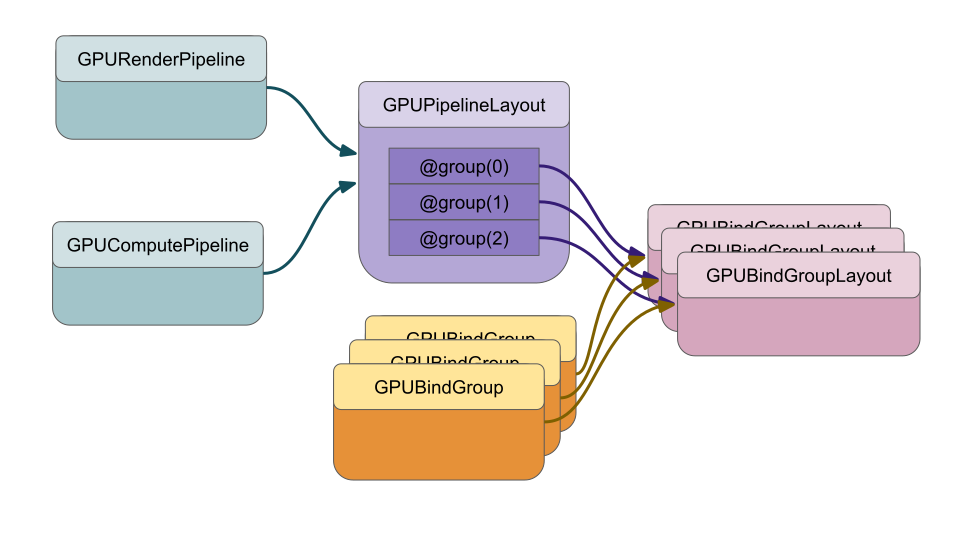
为什么需要绑定组布局?
绑定组布局(Bind Group Layouts)让 WebGPU 能够高效地将绑定组(Bind Groups)与计算管线(Compute Pipelines)和渲染管线(Render Pipelines)进行匹配。其核心思想是:把耗时的详细校验前移到创建绑定组时完成,而在真正绘制或调度计算时只做极轻量的检查。
工作原理
一个管线(如 GPUComputePipeline 或 GPURenderPipeline)使用一个 GPUPipelineLayout,其中定义了 0 个或多个 GPUBindGroupLayout。每个 GPUBindGroupLayout 被分配到特定的组索引(group index)。绑定组也是用特定的 GPUBindGroupLayout 创建的。
当调用 draw 或 dispatchWorkgroups 时,WebGPU 只需要检查当前管线的 GPUPipelineLayout 中每个组索引对应的 GPUBindGroupLayout 是否与当前通过 setBindGroup 绑定的绑定组匹配。这个检查非常简单,因为大部分详细检查已经在创建绑定组时完成了。
如果使用 layout: 'auto' 创建管线,WebGPU 会自动生成 GPUPipelineLayout 并填充 GPUBindGroupLayout。但在以下两种情况下,你应该手动创建布局:
- 需要不同于默认
'auto'的布局 —— 例如使用rgba32float纹理时。 - 希望在多个管线间共享同一个绑定组 —— 自动生成的布局不能跨管线复用。
一、使用不同于 layout: 'auto' 的布局:rgba32float 纹理
默认情况下,texture_2d<f32> 绑定会被自动推断为需要可过滤(filterable)的纹理。但 rgba32float(以及所有 xxx32float 格式)默认不可过滤,除非设备支持可选特性。因此直接使用 layout: 'auto' 会导致校验错误。
问题代码(修改前)
const textureData = new Uint8Array([  // 原为 Uint8Array
  b, _, _, _, _,
  ...
].flat());

const texture = device.createTexture({
  size: [kTextureWidth, kTextureHeight],
  format: 'rgba8unorm',   // 原格式
  usage: GPUTextureUsage.TEXTURE_BINDING | GPUTextureUsage.COPY_DST,
});
改为 rgba32float 后:
const _ = [1, 0, 0, 1]; // red
const y = [1, 1, 0, 1]; // yellow
const b = [0, 0, 1, 1]; // blue
const textureData = new Float32Array(
  [
    b,
    _,
    _,
    _,
    _,
    _,
    y,
    y,
    y,
    _,
    _,
    y,
    _,
    _,
    _,
    _,
    y,
    y,
    _,
    _,
    _,
    y,
    _,
    _,
    _,
    _,
    y,
    _,
    _,
    _,
    _,
    _,
    _,
    _,
    _,
  ].flat(),
);

const texture = device.createTexture({
  size: [kTextureWidth, kTextureHeight],
  format: "rgba32float",
  usage: GPUTextureUsage.TEXTURE_BINDING | GPUTextureUsage.COPY_DST,
});
device.queue.writeTexture(
  { texture },
  textureData,
  { bytesPerRow: kTextureWidth * 4 * 4 }, // 注意每个浮点占4字节
  { width: kTextureWidth, height: kTextureHeight },
);
运行后浏览器报错类似于:
None of the supported sample types (UnfilterableFloat) of [Texture “yellow F on red”] match the expected sample types (Float).
While validating entries[1] as a Sampled Texture. Expected entry layout:{sampleType: TextureSampleType::Float, ...}
这说明自动布局默认期望 sampleType: "float"(可过滤),而 rgba32float 只支持 "unfilterable-float"。
解决方案:手动创建布局
首先创建 GPUBindGroupLayout,将采样器类型改为 'non-filtering',纹理采样类型改为 'unfilterable-float':
const bindGroupLayout = device.createBindGroupLayout({
  entries: [
    {
      binding: 0,
      visibility: GPUShaderStage.FRAGMENT,
      sampler: {
        type: "non-filtering", // 改为非过滤
      },
    },
    {
      binding: 1,
      visibility: GPUShaderStage.FRAGMENT,
      texture: {
        sampleType: "unfilterable-float", // 改为不可过滤浮点
        viewDimension: "2d",
        multisampled: false,
      },
    },
  ],
});
然后创建 GPUPipelineLayout 并在管线中使用:
const pipelineLayout = device.createPipelineLayout({
  bindGroupLayouts: [bindGroupLayout],
});

const pipeline = device.createRenderPipeline({
  label: "hardcoded textured quad pipeline",
  layout: pipelineLayout, // 替换原来的 layout: 'auto'
  vertex: { module },
  fragment: {
    module,
    targets: [{ format: presentationFormat }],
  },
});
现在 rgba32float 纹理就能正常工作了。
注意:如果采样器的
magFilter、minFilter或mipmapFilter设置为'linear',则仍会报错,因为非过滤采样器不允许线性过滤。
二、使用不同布局:动态偏移(Dynamic Offsets)
默认情况下,绑定组中的 uniform/storage buffer 在创建时就固定了整个缓冲区或指定的 offset+length,之后无法更改。如果希望在调用 setBindGroup 时动态改变 offset,就必须在布局中设置 hasDynamicOffset: true。
修改计算着色器
@group(0) @binding(0) `var<storage, read_write>` a: `array<f32>`;
@group(0) @binding(1) `var<storage, read_write>` b: `array<f32>`;
@group(0) @binding(2) `var<storage, read_write>` dst: `array<f32>`;

@compute @workgroup_size(1) fn computeSomething(
  @builtin(global_invocation_id) id: vec3u
) {
  let i = id.x;
  dst[i] = a[i] + b[i];
}
创建带动态偏移的布局
const bindGroupLayout = device.createBindGroupLayout({
  entries: [
    {
      binding: 0,
      visibility: GPUShaderStage.COMPUTE,
      buffer: { type: "storage", hasDynamicOffset: true },
    },
    {
      binding: 1,
      visibility: GPUShaderStage.COMPUTE,
      buffer: { type: "storage", hasDynamicOffset: true },
    },
    {
      binding: 2,
      visibility: GPUShaderStage.COMPUTE,
      buffer: { type: "storage", hasDynamicOffset: true },
    },
  ],
});
创建管线时使用该布局:
const pipelineLayout = device.createPipelineLayout({
  bindGroupLayouts: [bindGroupLayout],
});

const pipeline = device.createComputePipeline({
  label: "add elements compute pipeline",
  layout: pipelineLayout,
  compute: { module },
});
准备缓冲区
偏移量必须是 256 的倍数(取决于设备限制,见 minStorageBufferOffsetAlignment)。这里创建一个 768 字节的缓冲区,支持 0、256、512 三个偏移:
const input = new Float32Array(64 * 3);
input.set([1, 3, 5]);
input.set([11, 12, 13], 64);

const workBuffer = device.createBuffer({
  label: "work buffer",
  size: input.byteLength,
  usage:
    GPUBufferUsage.STORAGE | GPUBufferUsage.COPY_SRC | GPUBufferUsage.COPY_DST,
});
device.queue.writeBuffer(workBuffer, 0, input);
创建绑定组并指定偏移
绑定组中每个动态缓冲区需要指定 size(否则默认整个缓冲区),并在 setBindGroup 时传入偏移数组:
const bindGroup = device.createBindGroup({
  label: "bindGroup for work buffer",
  layout: pipeline.getBindGroupLayout(0),
  entries: [
    { binding: 0, resource: { buffer: workBuffer, size: 256 } },
    { binding: 1, resource: { buffer: workBuffer, size: 256 } },
    { binding: 2, resource: { buffer: workBuffer, size: 256 } },
  ],
});

// 编码命令
pass.setPipeline(pipeline);
pass.setBindGroup(0, bindGroup, [0, 256, 512]); // 三个动态偏移
pass.dispatchWorkgroups(3);
pass.end();
性能提示:动态偏移比非动态偏移略慢,因为偏移范围检查推迟到了
setBindGroup调用时。如果调用次数不多,影响可忽略;但若调用上千次,可能值得考虑创建多个固定偏移的绑定组。
三、在多个管线间共享绑定组
手动创建绑定组布局的另一个重要原因是复用绑定组。例如在渲染阴影的场景中,你可能希望全局、材质、局部等绑定组能被阴影管线和主渲染管线共用,而不必为每个管线重复创建。
这里用两个计算管线共享一个绑定组作为示例。
两个不同的计算着色器
const moduleTimes2 = device.createShaderModule({
  code: /* wgsl */ `
    @group(0) @binding(0) `var<storage, read_write>` data: `array<f32>`;
    @compute @workgroup_size(1) fn computeSomething(
      @builtin(global_invocation_id) id: vec3u
    ) {
      let i = id.x;
      data[i] = data[i] * 2.0;
    }
  `,
});

const modulePlus3 = device.createShaderModule({
  code: /* wgsl */ `
    @group(0) @binding(0) `var<storage, read_write>` data: `array<f32>`;
    @compute @workgroup_size(1) fn computeSomething(
      @builtin(global_invocation_id) id: vec3u
    ) {
      let i = id.x;
      data[i] = data[i] + 3.0;
    }
  `,
});
共享同一个布局
const bindGroupLayout = device.createBindGroupLayout({
  entries: [
    {
      binding: 0,
      visibility: GPUShaderStage.COMPUTE,
      buffer: { type: "storage", minBindingSize: 0 },
    },
  ],
});

const pipelineLayout = device.createPipelineLayout({
  bindGroupLayouts: [bindGroupLayout],
});

const pipelineTimes2 = device.createComputePipeline({
  label: "doubling compute pipeline",
  layout: pipelineLayout,
  compute: { module: moduleTimes2 },
});

const pipelinePlus3 = device.createComputePipeline({
  label: "plus 3 compute pipeline",
  layout: pipelineLayout,
  compute: { module: modulePlus3 },
});
使用同一个绑定组
const bindGroup = device.createBindGroup({
  label: "bindGroup for work buffer",
  layout: bindGroupLayout, // 注意直接使用共享布局
  entries: [{ binding: 0, resource: workBuffer }],
});

const encoder = device.createCommandEncoder();
const pass = encoder.beginComputePass();
pass.setPipeline(pipelineTimes2);
pass.setBindGroup(0, bindGroup);
pass.dispatchWorkgroups(input.length);
pass.setPipeline(pipelinePlus3); // 切换管线,绑定组不变
pass.dispatchWorkgroups(input.length);
pass.end();
这样就用一个绑定组完成了两次不同计算。
绑定组布局注意事项
1. 每个条目必须声明 binding 索引
{ binding: 0, ... }
2. 每个条目必须声明可见的着色器阶段
visibility: GPUShaderStage.FRAGMENT | GPUShaderStage.VERTEX;
// 或
visibility: GPUShaderStage.COMPUTE |
  GPUShaderStage.FRAGMENT |
  GPUShaderStage.VERTEX;
3. 默认值
texture绑定的默认值:{ sampleType: 'float', viewDimension: '2d', multisampled: false }sampler绑定的默认值:{ type: "filtering"; }
因此常见用法可以简写为:
const bindGroupLayout = device.createBindGroupLayout({
  entries: [
    { binding: 0, visibility: GPUShaderStage.FRAGMENT, sampler: {} },
    { binding: 1, visibility: GPUShaderStage.FRAGMENT, texture: {} },
  ],
});
4. 尽可能声明 minBindingSize
当绑定的是 uniform buffer(或已知大小的 storage buffer)时,建议设置 minBindingSize,例如:
buffer: {
  type: 'uniform',
  minBindingSize: 32,  // 对应 uniform struct 的大小
}
这样 WebGPU 会在 createBindGroup 时检查缓冲区大小是否足够,而不是在每次 draw/dispatch 时检查,从而提升性能。对于声明为数组的 storage buffer,如果允许不同大小,可以不设置。
三个核心优化要点
-
显式声明绑定组布局以匹配纹理采样能力
使用rgba32float等不可过滤纹理时,必须手动创建GPUBindGroupLayout,将采样器设为'non-filtering'、纹理设为'unfilterable-float'。这避免了自动布局的默认假设,减少运行时错误,并确保管线能在目标设备上正确创建。 -
通过
minBindingSize提前验证缓冲区大小
在缓冲绑定中声明minBindingSize,使 WebGPU 在创建绑定组时完成大小检查,而不是在每次绘制/调度时重复检查。这显著减少了 draw call 的 CPU 开销,尤其适用于大量绘制调用。 -
复用绑定组布局与绑定组,减少资源创建与切换成本
手动创建GPUBindGroupLayout和GPUPipelineLayout,使多个管线共享同一绑定组。这避免了为每个管线重复创建类似的绑定组,简化代码并提升内存效率。同时在设计绑定组结构时,将全局、材质、局部数据分层,可进一步提高渲染循环的清晰度和性能。
GLSL / WebGL 专业术语检查
本文涉及的技术为 WebGPU,使用的是 WGSL(WebGPU Shading Language),而非 WebGL/GLSL。但读者若来自 WebGL 背景,需注意以下术语对照:
| 英文术语 | 中文推荐 | 备注 |
|---|---|---|
| Bind Group Layout | 绑定组布局 | WebGPU 独有概念,类似 WebGL 中的 uniform block / texture unit 组织方式,但更显式 |
| GPUBindGroupLayout | GPU 绑定组布局对象 | API 接口名保留英文 |
| GPUPipelineLayout | GPU 管线布局对象 | 同上 |
| GPUShaderStage | GPU 着色器阶段 | 对应 VERTEX / FRAGMENT / COMPUTE |
| Storage Buffer | 存储缓冲区 | 类似于 GLSL 中 SSBO(Shader Storage Buffer Object) |
| Uniform Buffer | 统一缓冲区 | 对应 WebGL 的 UBO |
| Sampler | 采样器 | 对应 GLSL 的 sampler2D 等,但 WebGPU 中采样器是独立资源 |
| Filterable / Unfilterable | 可过滤 / 不可过滤 | 指纹理是否支持线性过滤 |
texture_2d<f32> | 2D 浮点纹理 | WGSL 类型,不同于 GLSL 的 sampler2D |
rgba32float | RGBA 32 位浮点纹理格式 | 对应 GLSL 中 GL_RGBA32F |
| Dynamic Offsets | 动态偏移 | WebGPU 特有,用于在 setBindGroup 时调整缓冲区偏移 |
minBindingSize | 最小绑定大小 | 用于提前校验缓冲区大小 |
重要提醒:WebGPU 使用 WGSL,GLSL 代码不能直接用于 WebGPU。迁移时需将 uniform、in/out、sampler2D 等语法改写为 WGSL 的 @group/@binding、var<uniform>、texture_2d 等。
本文基于 webgpufundamentals.org 的同名教程深度编译,省略了部分导航与交互内容,保留了核心概念与代码示例。如需查看完整示例和交互演示,请访问原始链接。