WebGPU 纹理
原文作者: webgpufundamentals Contributors
原始链接: https://webgpufundamentals.org/webgpu/lessons/webgpu-textures.html
前言
本文是 WebGPU 系列教程中关于如何向着色器提供数据的第五篇,聚焦于**纹理(Texture)这一核心数据通道。纹理在 WebGPU 中不仅仅用于 2D 图像,更是通过硬件采样器(Sampler)**实现高效过滤与插值的关键机制。本文将深入解读纹理的基础概念、采样机制、过滤模式、Mipmap 生成以及纹理类型与格式,并保留核心代码片段以帮助读者掌握实践要点。
一、纹理基础:为什么需要纹理?
纹理通常代表一张 2D 图像,本质上是一个 2D 颜色数组。我们完全可以用存储缓冲区(Storage Buffer)来模拟,但纹理的特殊之处在于它可以被一种专用硬件——**采样器(Sampler)**访问。采样器能够一次性读取纹理中最多 16 个值,并根据过滤设置进行混合,这对于图像缩放、平滑显示等常见需求极为高效。
纹理坐标
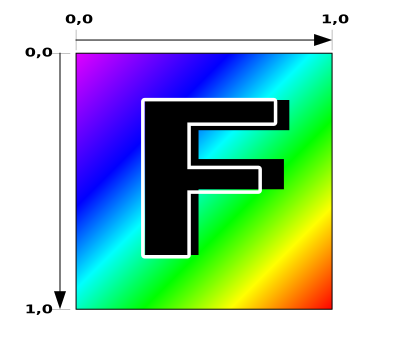
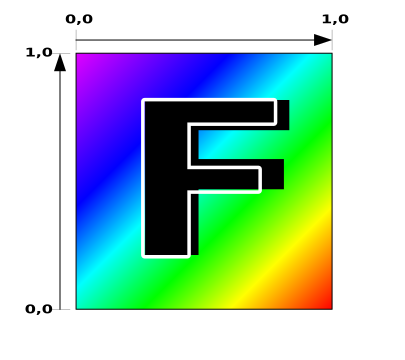
纹理坐标(UV 坐标)在采样时以归一化形式表示,范围为 0.0 到 1.0,与纹理的实际尺寸无关。坐标 (0,0) 对应纹理数据的第一个纹素(texel),通常位于纹理的左下角(取决于数据排列方式)。
简单示例:绘制带纹理的四边形
将之前的三角形示例改为四边形(两个三角形),并在着色器中使用纹理采样:
struct OurVertexShaderOutput {
  @builtin(position) position: vec4f,
  @location(0) texcoord: vec2f,
};

@vertex fn vs(
  @builtin(vertex_index) vertexIndex : u32
) -> OurVertexShaderOutput {
  let pos = array(
    // 第一个三角形
    vec2f( 0.0,  0.0),  // 中心
    vec2f( 1.0,  0.0),  // 右中
    vec2f( 0.0,  1.0),  // 中上

    // 第二个三角形
    vec2f( 0.0,  1.0),  // 中上
    vec2f( 1.0,  0.0),  // 右中
    vec2f( 1.0,  1.0),  // 右上
  );

  var vsOutput: OurVertexShaderOutput;
  let xy = pos[vertexIndex];
  vsOutput.position = vec4f(xy, 0.0, 1.0);
  vsOutput.texcoord = xy;
  return vsOutput;
}

@group(0) @binding(0) var ourSampler: sampler;
@group(0) @binding(1) var ourTexture: `texture_2d<f32>`;

@fragment fn fs(fsInput: OurVertexShaderOutput) -> @location(0) vec4f {
  return textureSample(ourTexture, ourSampler, fsInput.texcoord);
}
⚠️ 注意:这里为了简化直接使用了裁剪空间位置作为纹理坐标。实际项目中纹理坐标通常通过顶点缓冲区提供。
二、纹理数据与创建
创建一个 5x7 纹素的纹理
const kTextureWidth = 5;
const kTextureHeight = 7;
const _ = [255,   0,   0, 255];  // 红
const y = [255, 255,   0, 255];  // 黄
const b = [  0,   0, 255, 255];  // 蓝
const textureData = new Uint8Array([
  b, _, _, _, _,
  _, y, y, y, _,
  _, y, _, _, _,
  _, y, y, _, _,
  _, y, _, _, _,
  _, y, _, _, _,
  _, _, _, _, _,
].flat());
创建 GPUTexture 对象
使用 rgba8unorm 格式,表示每个通道 8 位无符号归一化整数,在着色器中会被自动转换为 [0.0, 1.0] 的浮点值。
const texture = device.createTexture({
  size: [kTextureWidth, kTextureHeight],
  format: 'rgba8unorm',
  usage: GPUTextureUsage.TEXTURE_BINDING | GPUTextureUsage.COPY_DST,
});

device.queue.writeTexture(
  { texture },
  textureData,
  { bytesPerRow: kTextureWidth * 4 },
  { width: kTextureWidth, height: kTextureHeight },
);
创建采样器并绑定
const sampler = device.createSampler();

const bindGroup = device.createBindGroup({
  layout: pipeline.getBindGroupLayout(0),
  entries: [
    { binding: 0, resource: sampler },
    { binding: 1, resource: texture },
  ],
});
三、过滤模式:magFilter 与 minFilter
采样器可以配置不同的过滤模式,影响纹理被放大或缩小时的颜色计算方式。
magFilter(放大过滤)
当纹理被放大显示时,采样器默认使用 nearest(最近邻),也可以设置为 linear(线性插值)。线性插值会取周围 4 个纹素,根据纹理坐标的小数部分进行混合,产生更平滑的结果。
const sampler = device.createSampler({
  magFilter: 'linear',
  addressModeU: 'repeat',
  addressModeV: 'repeat',
});
minFilter(缩小过滤)
当纹理被缩小显示时,如果仍使用 linear,由于只取 4 个纹素混合,会导致严重的闪烁和颜色跳动。解决方案是使用 Mipmap。
四、Mipmap:解决缩小闪烁的关键
Mipmap(多级渐远纹理)是一系列逐级缩小的纹理,每一级都是上一级尺寸的一半(向下取整),并预先混合颜色。当纹理被缩小时,GPU 可以根据实际绘制尺寸自动选择合适的 Mip 级别,避免单次采样带来的闪烁。
生成 Mipmap 的示例代码
const lerp = (a, b, t) => a + (b - a) * t;
const mix = (a, b, t) => a.map((v, i) => lerp(v, b[i], t));
const bilinearFilter = (tl, tr, bl, br, t1, t2) => {
  const t = mix(tl, tr, t1);
  const b = mix(bl, br, t1);
  return mix(t, b, t2);
};

const createNextMipLevelRgba8Unorm = ({data: src, width: srcWidth, height: srcHeight}) => {
  const dstWidth = Math.max(1, srcWidth / 2 | 0);
  const dstHeight = Math.max(1, srcHeight / 2 | 0);
  const dst = new Uint8Array(dstWidth * dstHeight * 4);

  const getSrcPixel = (x, y) => {
    const offset = (y * srcWidth + x) * 4;
    return src.subarray(offset, offset + 4);
  };

  for (let y = 0; y < dstHeight; ++y) {
    for (let x = 0; x < dstWidth; ++x) {
      const u = (x + 0.5) / dstWidth;
      const v = (y + 0.5) / dstHeight;
      const au = (u * srcWidth - 0.5);
      const av = (v * srcHeight - 0.5);
      const tx = au | 0;
      const ty = av | 0;
      const t1 = au % 1;
      const t2 = av % 1;

      const tl = getSrcPixel(tx, ty);
      const tr = getSrcPixel(tx + 1, ty);
      const bl = getSrcPixel(tx, ty + 1);
      const br = getSrcPixel(tx + 1, ty + 1);

      const dstOffset = (y * dstWidth + x) * 4;
      dst.set(bilinearFilter(tl, tr, bl, br, t1, t2), dstOffset);
    }
  }
  return { data: dst, width: dstWidth, height: dstHeight };
};

const generateMips = (src, srcWidth) => {
  const srcHeight = src.length / 4 / srcWidth;
  let mip = { data: src, width: srcWidth, height: srcHeight };
  const mips = [mip];
  while (mip.width > 1 || mip.height > 1) {
    mip = createNextMipLevelRgba8Unorm(mip);
    mips.push(mip);
  }
  return mips;
};
创建带 Mipmap 的纹理
const mips = generateMips(textureData, kTextureWidth);

const texture = device.createTexture({
  label: 'yellow F on red',
  size: [mips[0].width, mips[0].height],
  mipLevelCount: mips.length,
  format: 'rgba8unorm',
  usage: GPUTextureUsage.TEXTURE_BINDING | GPUTextureUsage.COPY_DST,
});

mips.forEach(({data, width, height}, mipLevel) => {
  device.queue.writeTexture(
    { texture, mipLevel },
    data,
    { bytesPerRow: width * 4 },
    { width, height },
  );
});
五、mipmapFilter:Mip 级别之间的过渡
除了 magFilter 和 minFilter,还有 mipmapFilter,用于控制 Mip 级别切换时的过渡方式。设置为 linear 时,GPU 会从两个相邻 Mip 级别中采样并混合,产生更平滑的过渡,尤其适用于 3D 场景中的远景平面。
示例:绘制 8 个不同过滤组合的平面,可以直观对比。
const sampler = device.createSampler({
  addressModeU: 'repeat',
  addressModeV: 'repeat',
  magFilter: (i & 1) ? 'linear' : 'nearest',
  minFilter: (i & 2) ? 'linear' : 'nearest',
  mipmapFilter: (i & 4) ? 'linear' : 'nearest',
});
六、纹理类型与视图
WebGPU 支持三种基础纹理类型:
| 类型 | 说明 |
|---|---|
"1d" | 一维纹理,高度和深度固定为 1 |
"2d" | 二维纹理,最常用 |
"3d" | 三维纹理,可视为多个 2D 纹理的堆叠 |
纹理视图(Texture View) 则提供了更丰富的解释方式:
"2d"纹理可以有"2d-array"、"cube"、"cube-array"视图"1d"和"3d"纹理只能有同维度视图- 立方体纹理(Cube Map)常用于天空盒、环境映射等
在 WGSL 中,纹理类型与视图维度对应:
| 视图维度 | WGSL 类型 |
|---|---|
"1d" | texture_1d 或 texture_storage_1d |
"2d" | texture_2d、texture_storage_2d、texture_multisampled_2d 等 |
"2d-array" | texture_2d_array、texture_storage_2d_array |
"3d" | texture_3d、texture_storage_3d |
"cube" | texture_cube、texture_depth_cube |
"cube-array" | texture_cube_array、texture_depth_cube_array |
七、纹理格式概览
WebGPU 支持丰富的纹理格式,命名规则如 rgba8unorm、rg16float、rg11b10ufloat 等,其中字母表示通道(r/g/b/a),数字表示每通道位数,后缀表示数据类型:
unorm:无符号归一化(0 → 1)snorm:有符号归一化(-1 → +1)uint:无符号整数sint:有符号整数float:浮点数
某些格式还需要特殊特性支持(如 float32-filterable),并且采样器类型在 WGSL 中需匹配(texture_2d<f32>、texture_2d<i32>、texture_2d<u32>)。
3 个核心优化要点
-
使用 Mipmap 解决纹理缩小闪烁
当纹理被缩小显示时,必须生成 Mipmap 并设置minFilter: 'linear'(或配合mipmapFilter: 'linear'),否则会出现严重的颜色跳动和视觉噪声。Mipmap 预先混合了各级颜色,使 GPU 能选择合适级别或进行级别间过渡。 -
合理选择过滤模式以平衡性能与画质
所有过滤均设为linear可获得最佳平滑效果,但采样时需要读取 8 个纹素(2D 纹理),而nearest只需 1 个纹素。对于像素风格游戏或性能敏感场景,应优先使用nearest;对于需要平滑缩放的场景,使用linear+ Mipmap。 -
根据硬件能力选择纹理格式与采样器
某些纹理格式(如rgba32float)默认不可过滤,除非启用float32-filterable特性。在移动设备上,32 位浮点纹理过滤通常不可用,因此应尽量使用rgba16float或rgba8unorm等更通用的格式。同时,注意 WGSL 中纹理泛型参数(<f32>、<i32>、<u32>)必须与纹理格式匹配。
GLSL/WebGL 专业术语检查
本文涉及的部分术语在 GLSL/WebGL 中有对应概念,为确保读者不混淆,特此对照说明:
| WebGPU / WGSL 术语 | GLSL / WebGL 对应术语 | 说明 |
|---|---|---|
texture_2d<f32> | sampler2D | 二维纹理对象 |
sampler | sampler(在 GLSL 中通常与纹理绑定,但概念相同) | 采样器,定义过滤和寻址模式 |
textureSample() | texture() 或 texture2D() | 纹理采样函数 |
magFilter / minFilter | GL_TEXTURE_MAG_FILTER / GL_TEXTURE_MIN_FILTER | 放大/缩小过滤模式 |
nearest / linear | GL_NEAREST / GL_LINEAR | 最近邻 / 线性插值 |
mipmapFilter | GL_TEXTURE_MIN_FILTER 中的 GL_LINEAR_MIPMAP_LINEAR 等 | Mipmap 过滤 |
addressModeU/V (repeat, clamp-to-edge) | GL_REPEAT, GL_CLAMP_TO_EDGE | 纹理坐标包裹模式 |
rgba8unorm | GL_RGBA8 | 纹理内部格式 |
mipLevelCount | glGenerateMipmap() 后自动生成 | Mipmap 级别数量 |
GPUTextureUsage.RENDER_ATTACHMENT | gl.framebufferTexture2D() | 渲染到纹理 |
在 GLSL 中,采样器通常直接与纹理绑定,而在 WebGPU/WGSL 中,纹理和采样器是独立的资源,通过绑定组分别绑定。这一设计使得采样器可以复用,也便于精确控制过滤行为。
总结
本文深入解读了 WebGPU 纹理的基础概念与采样机制,涵盖了纹理数据创建、过滤模式、Mipmap 生成、纹理类型与视图以及纹理格式等核心内容。通过合理配置采样器和纹理格式,开发者能够在 WebGPU 中高效地实现高质量图像渲染。后续文章将继续探讨图像导入、视频纹理、立方体贴图等进阶主题。