WebGPU 顶点缓冲区:从存储缓冲到索引绘制
原文标题:WebGPU Vertex Buffers
原文作者:webgpufundamentals Contributors
原始链接:https://webgpufundamentals.org/webgpu/lessons/webgpu-vertex-buffers.html
本文是对 WebGPU 系列教程中“顶点缓冲区(Vertex Buffers)”一文的深度解读与编译,而非逐字全盘翻译。文中保留了核心 WGSL/JavaScript 代码,并在关键处加入中文说明,帮助理解 WebGPU 如何将顶点数据从存储缓冲区迁移到传统顶点缓冲区,并进一步实现实例化、归一化属性与索引绘制。

1. 为什么需要顶点缓冲区?
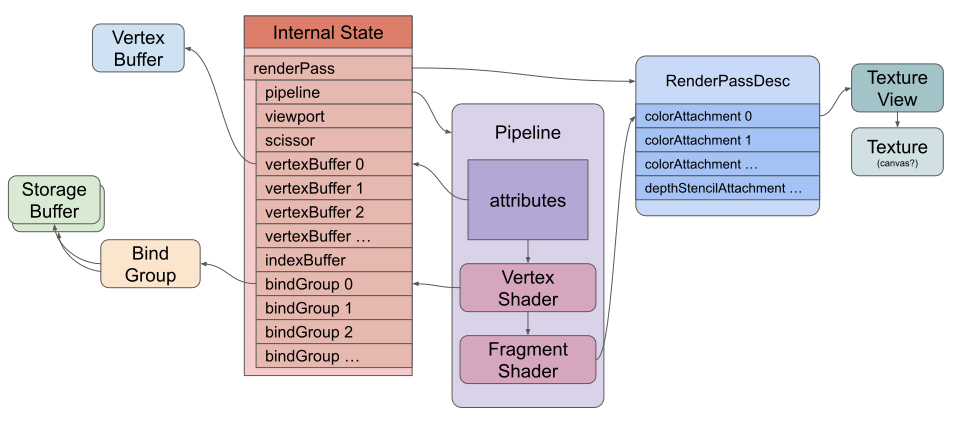
在上一篇关于存储缓冲区(Storage Buffers)的文章中,我们通过内建变量 vertex_index 在着色器中索引顶点数据。虽然这种方式逐渐流行,但传统方法仍然是将顶点数据放入顶点缓冲区,通过**顶点属性(Vertex Attributes)**提供给顶点着色器。
顶点缓冲区本质上和普通 WebGPU 缓冲区一样,但区别在于:我们不在着色器中直接访问它,而是告诉 WebGPU 缓冲区中的数据布局,由 GPU 固定功能自动提取并填充到着色器入口。
2. 从存储缓冲区切换到顶点缓冲区
2.1 着色器修改
首先将 Vertex 结构体中的 position 字段加上 @location(0) 属性,表示从顶点缓冲区的位置 0 读取数据:
struct OtherStruct {
  scale: vec2f,
};

struct Vertex {
  @location(0) position: vec2f,   // 关键变化:增加 @location(0)
};

struct VSOutput {
  @builtin(position) position: vec4f,
  @location(0) color: vec4f,
};

@group(0) @binding(0) `var<storage, read>` ourStructs: `array<OurStruct>`;
@group(0) @binding(1) `var<storage, read>` otherStructs: `array<OtherStruct>`;
// 移除:@group(0) @binding(2) `var<storage, read>` pos: `array<Vertex>`;

@vertex fn vs(
  vert: Vertex,   // 不再使用 @builtin(vertex_index)
  @builtin(instance_index) instanceIndex: u32
) -> VSOutput {
  let otherStruct = otherStructs[instanceIndex];
  let ourStruct = ourStructs[instanceIndex];

  var vsOut: VSOutput;
  vsOut.position = vec4f(
      vert.position * otherStruct.scale + ourStruct.offset, 0.0, 1.0);
  vsOut.color = ourStruct.color;
  return vsOut;
}
核心变化:
- 移除了
@group(0) @binding(2)的存储缓冲区pos。 - 将
@builtin(vertex_index)替换为直接接收Vertex结构体。
2.2 渲染管线描述顶点缓冲区
在创建渲染管线时,需要描述缓冲区布局(buffers 数组):
const pipeline = device.createRenderPipeline({
  label: 'vertex buffer pipeline',
  layout: 'auto',
  vertex: {
    module,
    buffers: [
      {
        arrayStride: 2 * 4, // 2 个 float32,共 8 字节
        attributes: [
          {shaderLocation: 0, offset: 0, format: 'float32x2'}, // position
        ],
      },
    ],
  },
  fragment: {
    module,
    targets: [{ format: presentationFormat }],
  },
});
arrayStride:从一个顶点到下一个顶点之间的字节数(步长)。attributes:定义每个顶点属性的位置、偏移和格式。shaderLocation: 0对应着色器中的@location(0)。format: 'float32x2'表示读取两个 32 位浮点数。
2.3 创建顶点缓冲区并设置到渲染通道
缓冲区使用方式从 STORAGE 改为 VERTEX:
const vertexBuffer = device.createBuffer({
  label: 'vertex buffer vertices',
  size: vertexData.byteLength,
  usage: GPUBufferUsage.VERTEX | GPUBufferUsage.COPY_DST,
});
device.queue.writeBuffer(vertexBuffer, 0, vertexData);
绘制时通过 setVertexBuffer(0, vertexBuffer) 绑定:
pass.setPipeline(pipeline);
pass.setVertexBuffer(0, vertexBuffer);
这里的索引 0 对应管线描述中 buffers 数组的第 0 项。
3. 实例化(Instancing)与多缓冲区
除了逐顶点属性,属性还可以逐实例(per-instance)推进。这正好替代了之前用 instance_index 索引存储缓冲区的做法。
3.1 着色器改为纯顶点属性
struct Vertex {
  @location(0) position: vec2f,
  @location(1) color: vec4f,
  @location(2) offset: vec2f,
  @location(3) scale: vec2f,
};

struct VSOutput {
  @builtin(position) position: vec4f,
  @location(0) color: vec4f,
};

@vertex fn vs(
  vert: Vertex,
) -> VSOutput {
  var vsOut: VSOutput;
  vsOut.position = vec4f(
      vert.position * vert.scale + vert.offset, 0.0, 1.0);
  vsOut.color = vert.color;
  return vsOut;
}
3.2 管线描述多缓冲区与实例步进模式
vertex: {
  module,
  buffers: [
    {
      arrayStride: 2 * 4, // position
      attributes: [
        {shaderLocation: 0, offset: 0, format: 'float32x2'},
      ],
    },
    {
      arrayStride: 6 * 4, // color + offset,共 6 个 float32
      stepMode: 'instance',   // 逐实例推进
      attributes: [
        {shaderLocation: 1, offset:  0, format: 'float32x4'}, // color
        {shaderLocation: 2, offset: 16, format: 'float32x2'}, // offset
      ],
    },
    {
      arrayStride: 2 * 4, // scale
      stepMode: 'instance',
      attributes: [
        {shaderLocation: 3, offset: 0, format: 'float32x2'}, // scale
      ],
    },
  ],
},
stepMode: 'instance' 表示该属性每个实例才前进一步,而默认的 'vertex' 则是每个顶点前进一步。
3.3 绑定多个顶点缓冲区
pass.setVertexBuffer(0, vertexBuffer);
pass.setVertexBuffer(1, staticVertexBuffer);
pass.setVertexBuffer(2, changingVertexBuffer);
这样完全移除了存储缓冲区和 bind group 的需求。
4. 交错属性与默认值
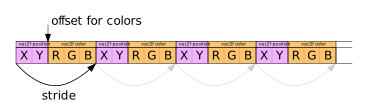
我们可以在一个缓冲区中交错存储多个属性。例如,为每个顶点添加颜色 perVertexColor:
struct Vertex {
  @location(0) position: vec2f,
  @location(1) color: vec4f,
  @location(2) offset: vec2f,
  @location(3) scale: vec2f,
  @location(4) perVertexColor: vec3f,
};
对应的缓冲区布局(position 2 个 float + perVertexColor 3 个 float):
{
  arrayStride: 5 * 4, // 5 个 float32 = 20 字节
  attributes: [
    {shaderLocation: 0, offset: 0, format: 'float32x2'},  // position
    {shaderLocation: 4, offset: 8, format: 'float32x3'},  // perVertexColor
  ],
},
有趣的是:着色器中的 perVertexColor 声明为 vec3f,但可以改为 vec4f,无需修改 JavaScript 数据。这是因为 GPU 会自动将缺失的第四个分量填充为默认值 1(即 (0,0,0,1))。
@location(4) perVertexColor: vec4f,
这样 vert.perVertexColor 可直接作为 vec4f 使用,第四个分量自动为 1。
5. 使用归一化属性节省空间
颜色不需要 32 位浮点精度。使用 8 位无符号整数并让 GPU 自动归一化到 [0,1] 能显著减少带宽。
5.1 修改数据布局
原来 perVertexColor 使用 3 个 float32,共 12 字节;改为 unorm8x4 后仅需 4 字节(RGB 各 1 字节 + 1 字节填充或 alpha)。实例颜色也从 float32x4 改为 unorm8x4。
const staticUnitSize =
  4 +         // color 为 4 字节(unorm8x4)
  2 * 4;      // offset 仍为 2 个 float32
写入时使用 Uint8Array 视图:
const staticVertexValuesU8 = new Uint8Array(staticVertexBufferSize);
const staticVertexValuesF32 = new Float32Array(staticVertexValuesU8.buffer);

// 设置颜色(0~255)
staticVertexValuesU8.set(
  [rand() * 255, rand() * 255, rand() * 255, 255],
  staticOffsetU8 + kColorOffset);

// 设置偏移(float32,注意偏移单位)
staticVertexValuesF32.set(
  [rand(-0.9, 0.9), rand(-0.9, 0.9)],
  staticOffsetF32 + kOffsetOffset);
5.2 更新管线属性格式
{
  arrayStride: 2 * 4 + 4, // position(8字节) + color(4字节)
  attributes: [
    {shaderLocation: 0, offset: 0, format: 'float32x2'}, // position
    {shaderLocation: 4, offset: 8, format: 'unorm8x4'},  // perVertexColor
  ],
},
{
  arrayStride: 4 + 2 * 4, // color(4字节) + offset(8字节)
  stepMode: 'instance',
  attributes: [
    {shaderLocation: 1, offset: 0, format: 'unorm8x4'},  // color
    {shaderLocation: 2, offset: 4, format: 'float32x2'}, // offset
  ],
},
这样每个顶点的颜色数据从 12 字节降至 4 字节,实例颜色从 16 字节降至 4 字节,总带宽节省约 40–50%。
6. 索引缓冲区(Index Buffers)
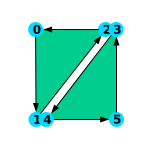
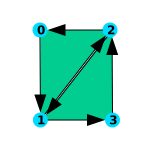
索引缓冲区描述顶点处理顺序。原来的圆形生成每个细分 6 个顶点(有重复),现在只生成 4 个唯一顶点,通过索引重用:
const numVertices = (numSubdivisions + 1) * 2; // 仅 4 个顶点/细分

const indexData = new Uint32Array(numSubdivisions * 6);
let ndx = 0;
// 索引序列:0,1,2, 2,1,3, ...
for (let i = 0; i < numSubdivisions; ++i) {
  const ndxOffset = i * 2;
  // 第一个三角形
  indexData[ndx++] = ndxOffset;
  indexData[ndx++] = ndxOffset + 1;
  indexData[ndx++] = ndxOffset + 2;
  // 第二个三角形
  indexData[ndx++] = ndxOffset + 2;
  indexData[ndx++] = ndxOffset + 1;
  indexData[ndx++] = ndxOffset + 3;
}
创建索引缓冲区 (usage: INDEX):
const indexBuffer = device.createBuffer({
  label: 'index buffer',
  size: indexData.byteLength,
  usage: GPUBufferUsage.INDEX | GPUBufferUsage.COPY_DST,
});
device.queue.writeBuffer(indexBuffer, 0, indexData);
绘制时设置索引缓冲区并调用 drawIndexed:
pass.setIndexBuffer(indexBuffer, 'uint32');
pass.drawIndexed(numVertices, kNumObjects);
这减少了 33% 的顶点内存占用,并可能提升顶点着色器缓存命中率。
7. 核心优化要点提炼
-
使用顶点缓冲区替代存储缓冲区,结合实例化减少 CPU→GPU 数据传输
顶点缓冲区允许 GPU 固定功能部件直接装配顶点属性,避免在着色器中通过vertex_index和instance_index手动索引存储缓冲区。配合stepMode: 'instance'可以将每个实例的共性数据单独存放,避免为每个顶点重复拷贝同一实例数据,从而减少显存带宽和 CPU 端处理。 -
优先使用归一化整数格式(如
unorm8x4)存储颜色等低精度数据
颜色、法线等归一化向量不需要 32 位浮点精度。改用unorm8x4/snorm8x4等格式,可在保持[0,1]或[-1,1]范围的同时,将属性占用的带宽和显存空间降低 50% 甚至更多。示例中每个顶点颜色从 12 字节降至 4 字节,实例颜色从 16 字节降至 4 字节。 -
使用索引缓冲区复用重复顶点,减少冗余处理
对于网格等含有大量共享顶点的几何体,索引缓冲区可以显著减少顶点缓冲区大小,并让 GPU 有机会复用顶点着色器的计算结果(通过缓存)。示例中圆形每个细分的顶点数从 6 个减少到 4 个,节省约 33% 的顶点存储和潜在的顶点着色器计算量。
8. GLSL/WebGL 与 WGSL/WebGPU 术语对照检查
虽然本文原文使用 WGSL/WebGPU(而非 GLSL/WebGL),但底层图形概念相通。以下为关键术语的中文翻译与适用性校验:
| 英文原文 | 简体中文推荐译法 | 备注 |
|---|---|---|
| Vertex Buffer | 顶点缓冲区 | WebGL 中同为 Vertex Buffer |
| Storage Buffer | 存储缓冲区 | WebGPU 特有,类似 GLSL 中的 SSBO |
| Bind Group | 绑定组 | WebGPU 的资源绑定概念,对应 WebGL 的 uniform/attribute 绑定 |
| Render Pipeline | 渲染管线 | WebGL 中对应 WebGLProgram + 状态集合 |
| Vertex Shader | 顶点着色器 | 通用 |
| Fragment Shader | 片元着色器 | WebGPU 官方中文也称“片段着色器”,本文采用“片元”以区分 |
| Attribute | 属性 / 顶点属性 | 注意:WGSL 中 attribute 指输入参数,与 WebGL 的 vertex attrib 概念一致 |
| Location | 位置 / 定位 | @location 对应 GLSL 中的 layout(location = N) |
| Builtin | 内建变量 | 如 @builtin(position)、@builtin(vertex_index) |
| Stride | 步长 | 指相邻顶点/实例数据之间的字节距离 |
| Offset | 偏移量 | 属性在缓冲区中的起始字节偏移 |
| Interleaved | 交错 | 多个属性在缓冲区中相邻存储 |
| Normalized | 归一化 | 如 unorm8x4 将整数 0 |
| Instance / Instancing | 实例 / 实例化 | stepMode: 'instance' |
| Index Buffer | 索引缓冲区 | 与 WebGL 的 ELEMENT_ARRAY_BUFFER 对应 |
| Draw Call | 绘制调用 | draw / drawIndexed |
| GPUBufferUsage | GPU 缓冲区用途标志 | 保留英文,不翻译 |
| Render Pass | 渲染通道 | WebGPU 概念,类似 WebGL 的 framebuffer 绑定过程 |
校验说明:本文内容涉及 WGSL 的显式
@location、@builtin等语法,与 GLSL 的layout(location=...)思路一致,但 WebGPU 的顶点缓冲区描述在渲染管线中完成,而 WebGL 通常在gl.vertexAttribPointer中动态设置。翻译时保留了“顶点缓冲区”“索引缓冲区”“实例化”等业界通用术语,同时避免将 WebGPU 特有的“渲染通道”“绑定组”混译为 WebGL 术语。
9. 小结
本文系统梳理了 WebGPU 顶点缓冲区的核心用法:从简单替换存储缓冲区,到多缓冲区实例化,再到归一化属性与索引缓冲区优化。理解这些机制有助于在 WebGPU 中构建高效、低带宽的渲染管线。
下一步可阅读教程中的 纹理(Textures) 章节。